
Background Info
◾️An address is the public identifier of an account. You can think of this as analogous to a bank account number or a phone number (for certain payment apps such as Venmo, etc.). Each account’s address will look something like this:
RL6VDLXCN5G7N2GRTS7YLVDSFT4PVBBUOVTVS7T26OQ5MLXYQKRMI5ADXY
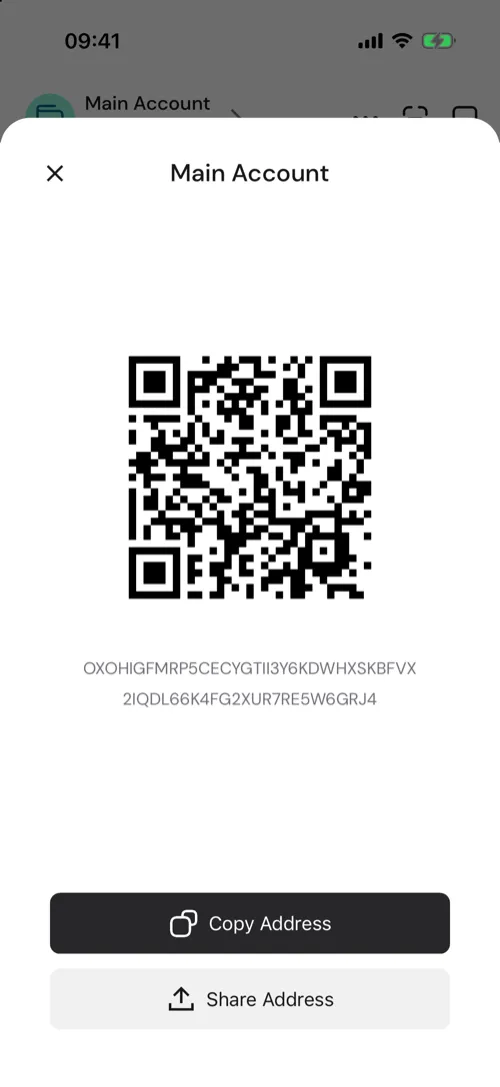
◾️You’ll use this address to deposit Algos and other assets to your Pera Wallet. You’ll also use this to share with other people or apps if they want to send you assets. These addresses can be shared via copy/paste or by sharing a QR representation of the address (as you’ll see below).
How to find an account’s address?
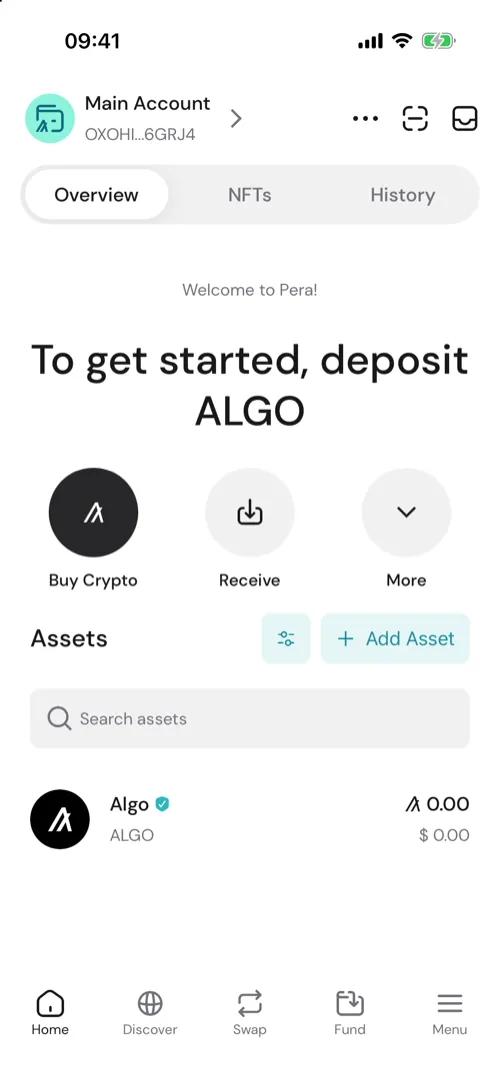
On the Accounts view, locate an account in your Pera Wallet. In this example, we’ll share an address of an account.
- Tap Receive
- Pera Wallet shows your account’s QR code and address. Tap Copy Address to copy it, or Share Address to send it to someone.
On a watch account, the Copy Address and Show QR buttons sit on the account’s home screen.
Additional Notes
Always use copy and paste (or QR share) when sending/sharing your address. Manually typing out the address is extremely error prone and can cause loss of funds.


 Download Now
 Get Extension



